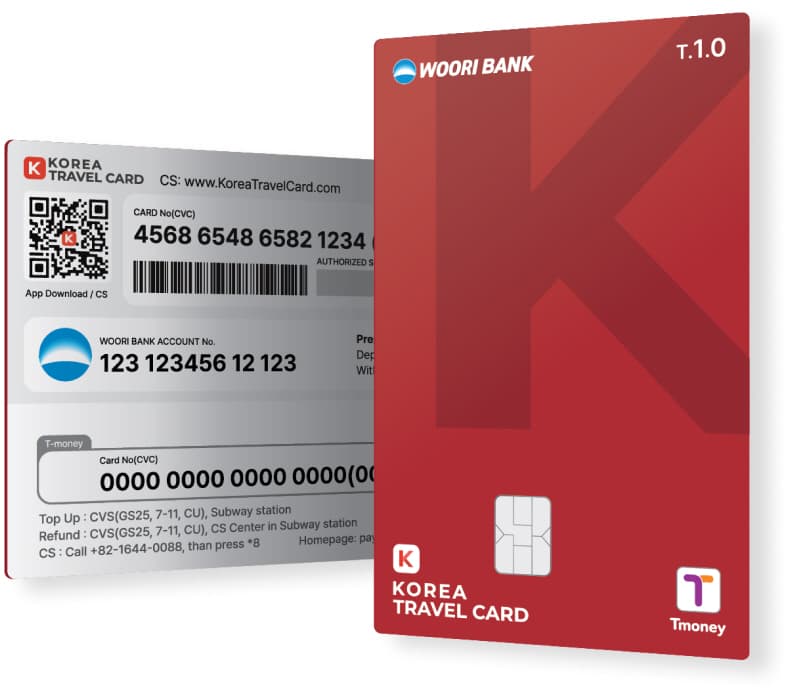


1. 交通卡+ 支付卡
2. 在机场银行取卡
3. 结算时可累积积分(0.2~50%)
4. 可在全国友利银行ATM(3742台)存取款
5. 友利银行所有分店将提供70%的汇率优惠

可在全国500万个商店安全结账的韩国代表银行卡 KOREA TRAVEL CARD!
到达韩国后,请立即在仁川机场友利银行安全取卡。 请以最佳汇率一次性解决从兑换到汇款!
KOREA TRAVEL CARD使用韩亚信用卡网,可在韩国任何地方进行结账。
.png)
V CARD

交通卡
全国巴士、首尔/济州市城市旅游巴士、机场豪华轿车(仁川国际机场-首尔/京畿/仁川圈运行)
全国地铁(根据韩国铁道公社政策,部分地区内的服务可能会受到限制。
全国出租车
KTX•新村•木槿花ITX青春•Nuriro等
全国长途汽车站
全国韩国道路公社收费站、民资收费站(部分道路除外)
*交通余额可在地铁交通卡充值终端或便利店(CU、GS25、7-11)充值。
便利汇款(充值)
无论在哪里,如愿以偿
机场银行、兑换处、便利店、自助服务机、App进行在线充值!
ZERO 手续费
没有汇款手续费、结账手续费,友利银行汇款时手续费ZERO!
到达韩国后,请立即在机场友利银行按最佳汇率兑换,免手续费汇款。
使用韩亚信用卡网,在全国任何地方都可以免手续费结账。
无限返还金&优惠
合作商店最多50%返现·折扣
每次结算时0.2%无限返还金
Google预约服务
提供全国10000多家合作商店预约服务

1. Please purchase according to the desired quantity and pick-up date.
2. Check mobile voucher or email voucher.
※ Serial number voucher will be sent via email, allowing you to issue the KOREA TRAVEL CARD.
※ If you haven't received the confirmation voucher, please check your spam folder or contact CS center.
3. Check the serial number on the voucher (25-character alphanumeric code starting with 'KTC_Travolution').
4. Install the Korea Travel Card app.
5. Open the app and enter the serial number in the promotion code field.-> A voucher for exchanging the physical card will be generated.
6. Present the generated voucher at the designated exchange location.
7. Receive your physical card and register the card in the Korea Travel Card app and start using it.
1. Incheon International Airport Terminal 1 (1F Public Area)
Near Gate 6 | 06:00 - 22:00
Near Gate 11 | 06:00 - 22:00
B1 East Side Woori Bank Branch | 09:00 - 16:00
2. Jeju Downtown
Visit Moneybox Currency Exchange Office Jeju Branch | 10:00 - 21:00
Location: #102, 1F, Wonnohyeong 4-gil 1, Jeju-si
3. Gimhae International Airport
Visit Moneybox Currency Exchange OfficeGimhae Airport Branch | 06:00 - 21:00
Location: 1F Waiting Area, Gimhae Airport Station (Busan-Gimhae Light Rail Transit)
APP Usage Guide
1. Please download the app and register as a member (email verification is required).
2. Check the back of your issued card and select the card type in the app. (A type - V CARD)
3. Select 'Register card' from the Home screen and make sure your card is recognized.
4. Deposit (Charge)
You can top up your payment balance through the app, banks, exchange offices, convenience stores, and kiosks.
Transportation balances can be replenished at subway card charging terminals and convenience stores.
Please check the detailed information through the link below.
>> KOREA TRAVEL CARD Usage Guide(Click)
※ Please select A Type (V CARD).
* This product is for foreign tourists.*
1. After completing the payment for the KOREA TRAVEL CARD, a QR code voucher will be sent via email, allowing you to issue the KOREA TRAVEL CARD.
* Please make sure to enter your email address.
2. There may be differences between the photos and the actual menu.
3. This cannot be combined with other events, promotions, or coupons.
4. Operating hours may change due to government social distancing guidelines. (Please check with the store before visiting.)
5. Once the reservation is confirmed, the voucher will be sent to the mobile phone message or email address you provided.
6. If you didn't receive the confirmation voucher, please check your spam folder or contact CS center.
7. RED TABLE CS Center : 02-6964-7958 (Business hours: Monday ~ Friday 9:00 ~ 18:00 (KST)/Closed on public holidays)
* For order/reservation inquiries, please contact RED TABLE CS Center directly.
Q&A


![[USIM] SKT 4G/LTE 无限流量数据 + 可通话 SIM](/_next/image?url=https%3A%2F%2Fdsj1e5gc359pm.cloudfront.net%2Fuploads%2Fproducts%2F1446%2Fmain%2Ffd9ce0cc-SKT-USIM-01.jpg&w=1080&q=75)
![[预付卡] WOWPASS 为外国旅行者准备的交通/结算/换钱的全套预付卡](/_next/image?url=https%3A%2F%2Fdsj1e5gc359pm.cloudfront.net%2Fuploads%2Fproducts%2F1388%2Fmain%2F21b811fe-940cover_en.jpg&w=1080&q=75)
![[SIM卡] 无限流量USIM卡](/_next/image?url=https%3A%2F%2Fdsj1e5gc359pm.cloudfront.net%2Fuploads%2Fproducts%2F129%2Fmain%2Fd112592e-KT-USIM.jpg&w=1080&q=75)
![[SIM卡] 无限/充值型4G LTE数据 + 通话SIM卡](/_next/image?url=https%3A%2F%2Fdsj1e5gc359pm.cloudfront.net%2Fuploads%2Fproducts%2F128%2Fmain%2F8e2e47de-Voice-%26-Data-SIM-card.jpg&w=1080&q=75)
![[首尔] DISCOVER SEOUL PASS 首尔转转卡 - 观光打折通行卡](/_next/image?url=https%3A%2F%2Fdsj1e5gc359pm.cloudfront.net%2Fuploads%2Fproducts%2F16%2Fmain%2F89a82447-%EC%84%9C%EC%9A%B8%ED%8C%A8%EC%8A%A4_%EC%8D%B8%EB%84%A4%EC%9D%BC_%EC%98%81_%EC%8B%A4%EB%AC%BC.jpg&w=1080&q=75)