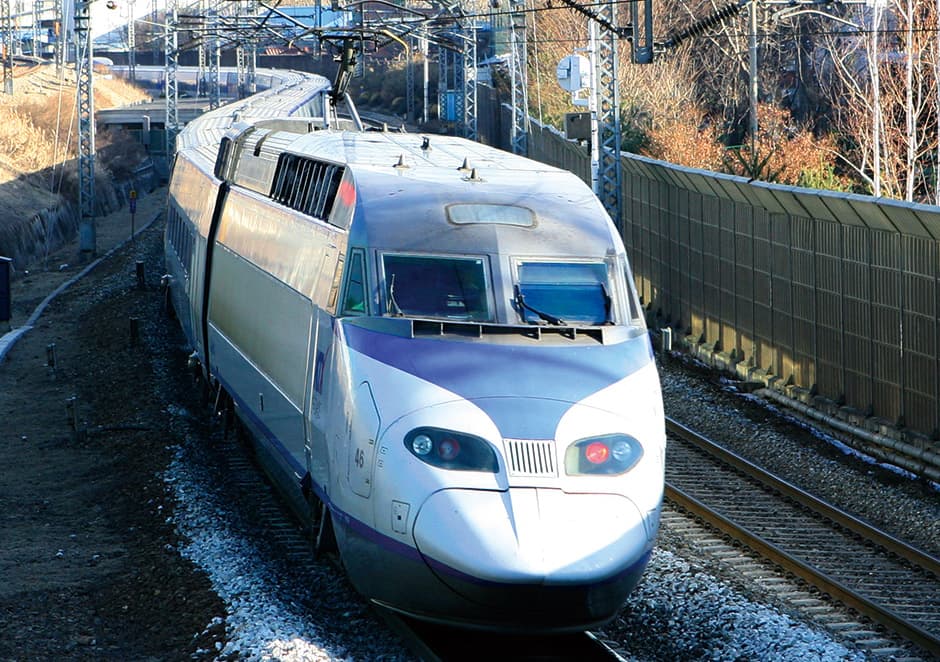


1. 以低價乘坐連接從首爾到釜山的大韓民國各個角落的高速列車KTX。
2. 請按照日程乘坐KTX!
3. 提前指定座位後,無需在車站乘坐口排隊,即可進站乘車。
請以低廉的價格購買從首爾到釜山只需2個小時的韓國高速火車KTX,並預訂座位!
韓國最快的列車KTX是深受韓國、外國人喜愛的交通工具。 以首爾出發爲準,到江陵需要2個小時,到釜山需要2.5個小時,到麗水需要3個小時,比公交車更寬敞、舒適的座位,可以輕鬆地移動! 如果因高價而猶豫購買,使用KR PASS在日程內無限制乘坐怎麼樣? 購買選擇券後, 提前預約座位的話, 可以毫無問題地訪問首爾以外的其它地方。
.jpg)
• 可以低價使用韓國高速火車KTX的特別機會!
.jpg)
• 在列車上眺望韓國都市以及郊外的景致。
.jpg)
• 請購買符合日程的票!

• 可在指定期間內無限次搭乘KTX列車,並最多可以事前劃位兩次。

• 如果無法事前劃位的人士,使用當天可以在KTX旅客中心預約!
KR PASS 種類

• 從首次搭乘起10天內,選擇2/3/4/5日卷後乘坐KTX的PASS。
• 推薦對象 : 沒有具體旅行計劃的人士
• 例子 : (4日卷) 2026年1月2日首次搭乘 - 1月4日第二次搭乘 - 1月7日第三次搭乘 - 1月11日最後一次搭乘
• 注意事項 : 預約日期(第一次搭乘日)到10日爲止有效。 已購買"選擇卷"的顧客中,想要追加購買"選擇卷"並使用時,自首次開始之日起不到10天時無法購買。 請嘗試從第一次開始到10天以後的日程購買或用普通(連續)券購買。
• 年齡標準
成人(Adult): 滿13歲以上
兒童(Child): 滿6歲-12歲
* 每13週歲以上的監護人可免費攜帶一名未滿6歲的幼兒。

1. Select the start date and complete the purchase.
2. Check email voucher.
3. Enter the 16 digit reservation number provided in the PDF file on the Korail website, and then select your desired seat.
- https://www.korail.com/global/eng/myReservation
4. Present the KR PASS, Printed Seat Ticket, and Passport to the staff when coming around to check on the train.
※ For those who did not make a reservation for the seating in advance, please make the reservation at the TRAVEL CENTER of KTX Station, not the ticket booth by presenting the KR PASS and passport on the day of the reservation.
[How to make the reservation for the seat]
1. Visit Korail Official Website.
2. Insert the number on the voucher in the 'KORAIL PASS NUMBER' section then select 'Inquiry'.


Select your desired usage date under 'Starting date of duration,' click 'Save' to save it, then click on 'Seat Reservation.
※For customer who have purchased the 'Select(fx) Pass Ticket'※
For customers to have purchased the 'select (fx) Pass ticket' must choose the desired date to choose the seats.
Select your chosen ticket from Reservation Information then select 'Details'.

After selecting your desired travel date under 'Date of Travel,' click 'Save' to save it, then click on 'Seat Reservation'.

After all the information is filled out, select 'Inquiry'.

Select the schedule you want to make reservation and click 'Seat Selection'.

Select the desired train car and seat number you want to make reservation and click 'Apply Selection'.

After that, click 'Reservation' at the bottom right.

Check the reservation information and click 'Next'.

After verifying the information, click 'Check out'.


Ticket issuance has been completed.
※ For those who purchased 'Select Pass', for better use, recommended choosing the seats in advance.
※ For those who did not choose your seats online, you can designate a seat at the TRAVEL CENTER of KTX Station.
1. KR PASS is a ticket only for foreigners. Koreans (Korean Passport) are not allowed to use.
2. Seat reservations are also available at the Travel Center at each train station, but we recommend you to proceed online in advance due to the long waiting line. (Seat reservations are unavailable on the Automatic Ticket Machine/Kiosk in the station.)
3. The 'Select Pass' must be used within 10 days from the reserved date and will not be allowed to be used after the valid date.
4. Valid within 10 days from the reservation date (Date of the 1st Ride). For those who have purchased the 'Select Pass' already, you can not purchase once again during the period which is not passed 10 days from first open date. Please try to purchase after 10 days from open date.
5. It must be used by the same person only. You will not be able to use it if the PASS name and the passport name are different. (selling nor lending to the third party is not permitted)
6. Unable to modify the information after reservation.
7. Must bring a valid Korail Pass (printed or mobile screen), Passport, and Printed seat ticket (If you reserve the seat)
* Screenshot of the seat ticket is not valid.
If the ticket is sold out, you can board a train as a standing ticket and bring the Korail Pass and a valid Passport.
8. There is no compensation for the delay or canceled train.
9. Please check the remaining seat at your preferred time and destination.
10. If you use illegally contrary to the effective use, you will be fined 10 to 30 times the normal fare.
11. Please note that during New Year's Day and Chuseok and before and after the date of those holidays, standing room and free seats may not be available to use.
12. For further inquiries, please use the KORAIL real-time chat (click) / English KORAIL CS team (+82-1599-7777, 8am~8pm KST) or visit the Travel Center at each train station.
[Notice when making the KR PASS seat reservation]
1. Seat reservations will be available from 30 days before the desired date.
2. Reservations are not available during the public holiday and summer peak season. If you cannot reserve a seat, you are allowed to use KORAIL PASS as a standing or free seat.
3. Seat Reservation for the KR PASS can be made twice per day. If you use both reservations, you can travel without restrictions in standing room, provided you hold a valid KR PASS.
Korail Pass Plus is an integrated pass product exclusively for Korail Pass customers, allowing you to enjoy both KORAIL PASS and NAMANE Card benefits with a single card.
It reduces the inconvenience of carrying a separate Korail Pass and transportation card, seamlessly connecting services to match your travel flow.
* NAMANE Card : A prepaid rechargeable transportation card that can be used for nationwide buses and subways (transportation balance top-up), as well as for offline store payments (payment balance top-up).
For more details, please visit the official website. : https://korailpassplus.korailnetworks.com/?lang=en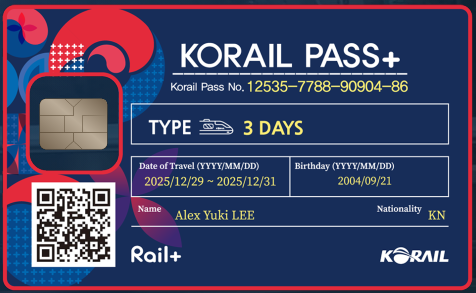
[How to use]
STEP 1. Purchase Korail Pass Plus
After purchasing the KORAIL PASS, apply through the link below:
Apply here >> https://korailpassplus.korailnetworks.com/?lang=en
- Price : 8,000 KRW
STEP 2. Receive QR Code
- After completing Korail Pass Plus payment, a QR code for picking up the product at the kiosk is issued
STEP 3. Pick up Product at NAMANE Card Kiosk
* Check Kiosk Location : https://en.namanecard.com/namanekiosk-list
- Select KORAIL PASS+ menu at kiosk > Scan QR code received in STEP 2 and print card
STEP 4. Top up NAMANE Card
- To use NAMANE Card, you need to top up the amount
- Top up via kiosk or designated charging method, usable immediately after charging
STEP 5. Use NAMANE Card
- Use nationwide public transportation such as subways and buses
- Easily solve movement during travel
* Check Detailed Usage and Places : https://en.namanecard.com/?redirect=no
STEP 6. Refund Guide and Customer Inquiry
- Refund possible before product receipt at kiosk (STEP 3)
- Automatic refund if not picked up within 60 days after Korail Pass Plus payment
• No refunds will be issued after the period specified above.
• No refund for same-day cancellations or no-shows.
In cases where the [Starting date of duration] have been changed, cancellations are permitted only up to 1 day prior to the final starting date as confirmed on Korail Website.
Q&A


![[USIM] SKT 4G/LTE 無限數據 + 可通話 SIM](/_next/image?url=https%3A%2F%2Fdsj1e5gc359pm.cloudfront.net%2Fuploads%2Fproducts%2F1446%2Fmain%2Ffd9ce0cc-SKT-USIM-01.jpg&w=1080&q=75)
![[預付卡] WOWPASS 爲外國旅行者準備的交通/結算/換錢的全套預付卡](/_next/image?url=https%3A%2F%2Fdsj1e5gc359pm.cloudfront.net%2Fuploads%2Fproducts%2F1388%2Fmain%2F21b811fe-940cover_en.jpg&w=1080&q=75)
![[SIM卡] 無限流量USIM卡](/_next/image?url=https%3A%2F%2Fdsj1e5gc359pm.cloudfront.net%2Fuploads%2Fproducts%2F129%2Fmain%2Fd112592e-KT-USIM.jpg&w=1080&q=75)
![[SIM卡] 無限/充值型4G LTE數據 + 通話SIM卡](/_next/image?url=https%3A%2F%2Fdsj1e5gc359pm.cloudfront.net%2Fuploads%2Fproducts%2F128%2Fmain%2F8e2e47de-Voice-%26-Data-SIM-card.jpg&w=1080&q=75)
![[首爾] DISCOVER SEOUL PASS 首爾轉轉卡 - 觀光打折通行卡](/_next/image?url=https%3A%2F%2Fdsj1e5gc359pm.cloudfront.net%2Fuploads%2Fproducts%2F16%2Fmain%2F89a82447-%EC%84%9C%EC%9A%B8%ED%8C%A8%EC%8A%A4_%EC%8D%B8%EB%84%A4%EC%9D%BC_%EC%98%81_%EC%8B%A4%EB%AC%BC.jpg&w=1080&q=75)